
Chapter 6 ETH#
The ETH RJ45 interface of the VD100 development board is located in the following figure:

In the petalinux project provided by us, both network ports have been configured. As shown in the figure below, after ETH1 and ETH2 are connected to the LAN, eth0 and eth1 are allocated to the IP through DHCP (eth2 is the network port on the USB HUB, which can be ignored).
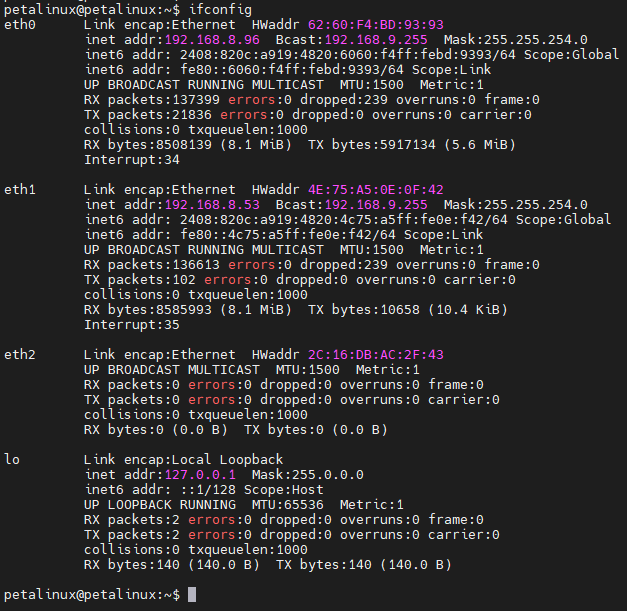
ETH2 (ETH2 on the development board and eth1 in the system) is slightly special. ETH2 is connected to the EMIO at the PL end, and the delay of PHY needs to be adjusted (please refer to the instructions demo/course_s2/documentations/datasheet/JL2x01_1000M_RGMII_Delay_Timing_Application_Note.pdf given by the PHY chip manufacturer for the reason of adjusting the delay).
First, modify the device tree demo/course_s2/petalinux/project-spec/meta-user/recipes-bsp/device-tree/files/system-user.dtsi - L56~71.
Then add an application to the system demo/course_s2/petalinux/project-spec/meta-user/recipes-apps/mdiorw to control mdio reading and writing.
After these are ready, we need to add a self-starting service demo/course_s2/petalinux/project-spec/meta-user/recipes-core/base-files (PS: if you also have the requirement of self-starting program, you can also refer to the file in this path).
After this setting, the system will configure the delay of the PHY chip of ETH2 after startup.